TikZ for LaTeX
Mechanics figures for LaTeX, as TikZ
Draw the mechanism once in the studio, in the line-art style of a textbook, and export it as TikZ code to paste into your paper, lecture notes or exam. The labels are typeset by LaTeX, so the figure matches the text around it.
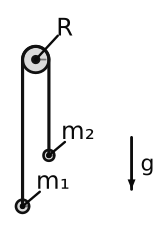
\begin{tikzpicture}[x=0.44pt, y=-0.44pt, >={Stealth}]
  \Ground{(30.6,300.8)}{(750.6,300.8)}{(0,9)}
  \Pulley{(390.6,90.8)}{5.81pt}
  \draw[o2d mass] (377.4,237.84) circle (3.96pt);
  \draw[o2d mass] (403.8,186.76) circle (3.17pt);
  \draw[o2d rope] (377.4,237.84) -- (377.4,90.8) -- …;
  \node[anchor=center] at (341.55,207.37) {$m_{1}$};
  \node[anchor=center] at (437.85,158.08) {$m_{2}$};
  …
\end{tikzpicture}Build it
Bodies, grounds, pins, pulleys, cables, springs, gears and linkages, or a classic problem to start from.
Add the figure's labels
Labels, dimensions, angle arcs, coordinate frames, gravity arrows and free-body diagrams; write a label in LaTeX: \ddot{x}_1, \frac{L}{2}.
Export → TikZ
A live preview, the scale and the label size; copy a tikzpicture or download a standalone document.
The code
Readable TikZ, two styles
Plain paths that reproduce the figure exactly, or Style → Macros: the figure as named pieces, \Ground, \Pulley and \PinSupport, with styles such as o2d mass and o2d spring that you restyle with one \tikzset.
- Needs tikz with the arrows.meta and patterns libraries
- Compiles with pdflatex, lualatex and xelatex
- A comment above the picture describes the figure for readers who cannot see it
Graphs too
pgfplots from the simulation
Any quantity you plot, a position, a force, an energy, exports as a pgfplots axis, so the graph in your document comes from the same run as the figure.
Exams
Exam variants with their answers
Make several variants of a problem with different numbers: the studio simulates each one and writes a LaTeX document of the exam class, every question with its figure in TikZ and its solution, and an answer key.
Other formats
The same figure as SVG, PDF and PNG
The screen and every export use the same drawing code, so what you see is what the TikZ, SVG, PDF and PNG contain.
Start from a classic problem
Open one and press Space
Plans Pro
TikZ and the other exports are part of Pro
The studio is free to try: build and run any scene in the browser, no installation. Pro, from €4.99 a month, adds the figure tools and every export. See the plans.
Free in your browser
Nothing to install; your scenes stay on your computer unless you save them to your account.