Free-body diagrams
Free-body diagrams from the forces themselves
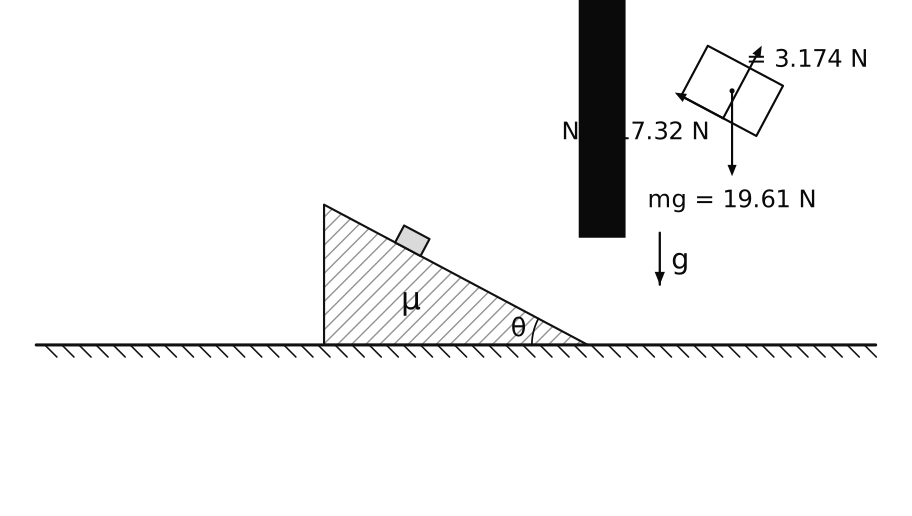
Build the problem, a block on a slope, a beam on a pin, a pulley system, and press Play. Click a body with the Free-Body Diagram tool and it is drawn alone with every force acting on it, at the point where it acts, labelled the way a textbook labels it.
Build or open the problem
Draw it with bodies, supports, pins, springs and cables, or open one of the classic problems.
Run or step it once
The contact and joint forces come from the solver's last step, so the diagram shows the forces of the motion you see.
Click the body
Annotate → Free-Body Diagram, then the body. Drag the diagram anywhere, or draw the arrows on the body itself.
On the diagram
Every force, labelled as in the book
Weight, normal force, friction and rolling resistance per touching body, cable tension, pin and weld reactions (as R or as Rx and Ry), spring, rod and gear forces, motor and spring torques, applied loads and air drag.
- Values on the arrows if you want them: N = 17.32 N
- Arrow lengths to scale, or all the same length
- ΣF and ΣM about the centre in Properties: zero for a body at rest, m·a for a moving one
Checked
The numbers agree with the hand calculation
The forces are the solver's, not a separate statics calculation. The Validation page compares them with closed forms: a block on an incline, the Atwood machine's tension and a beam's pin reactions agree to better than 0.01 %.
Trusses
Member forces of a truss
Analyze → Member Forces colours every rod by its axial force, tension red and compression blue, with its value beside it, as in the method of joints.
Out of the studio
Into your notes, slides or exam
Diagrams are saved with the scene and drawn in every export: SVG and PDF for documents, PNG for slides, and TikZ for LaTeX, where the labels become math ($N=17.32\,\mathrm{N}$).
Start from a classic problem
Open one and press Space
Plans Pro
Free-body diagrams and the exports are part of Pro
The studio is free to try: build and run any scene in the browser, no installation. Pro, from €4.99 a month, adds the figure tools and every export. See the plans.
Free in your browser
Nothing to install; your scenes stay on your computer unless you save them to your account.